


Monefy - Budget & Expenses app
3.92.59K Reviews
App Specs
- Version
- 1.22.8
- Updated On
- License
- Free
- Downloads
- 10,000,000+
- Developer
- Reflective Technologies
- Categories
- Finance
- Platform
- Android
Screenshots
 Analysis by AppCompare
I find a manual money tracker works best when it makes the small, repetitive task of logging a purchase feel manageable. That is the main question I’d ask before trying Monefy: will a quick entry help you notice your habits, or will you resent having to record each expense yourself? The app is built around that choice, and its straightforward layout makes the routine easier to stick with.
Who benefits from a hands-on budget
I’d recommend Monefy to someone who wants a simple record of day-to-day spending without connecting a bank account. It can suit students keeping an eye on food and transport, couples who want to compare household categories, or anyone trying to understand why their balance seems to shrink before payday. The benefit is not automatic financial advice; it is a clearer view of the choices you enter.
That approach has a useful trade-off. Typing in a purchase takes a little effort, but it also asks you to pause and name what you spent. If you buy a coffee, enter it immediately and choose the category that best reflects your own budget. Logging it later from memory is less reliable, especially for several small purchases that blur together.
A practical routine for everyday spending
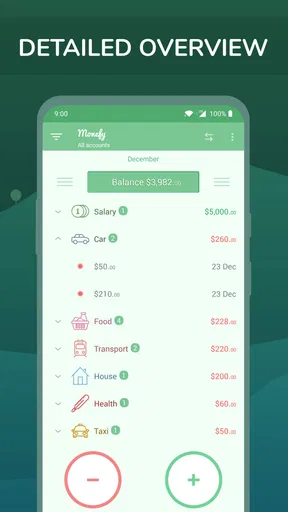
Imagine buying groceries on the way home, then paying for lunch the next day and picking up a few household items later in the week. I would record each amount close to the time of purchase, rather than saving a pile of receipts for Sunday. At the end of the week, the category view can help me see whether food costs are coming from planned shopping, convenience meals, or both.
A small setup decision can make those summaries more useful: create categories that reflect choices you can actually change. If “food” lumps groceries and restaurant meals together, the total may be accurate but not very actionable. Separating those habits can reveal where a modest adjustment is possible. On the other hand, creating a category for every shop or tiny purchase can make logging tedious, so I’d keep the list focused.
Category budgets work best as boundaries you check, not as a substitute for planning. I’d set a realistic amount based on ordinary spending, then review it before the category is exhausted. If the number is too strict, the app may feel like a scolding tool; if it is too loose, it won’t flag much. The useful middle ground is a limit that helps me make a decision while there is still time to change course.
How it compares with other money tools
Compared with a spreadsheet, Monefy offers a quicker phone-based way to enter purchases and view categories, while a spreadsheet gives more freedom to build custom calculations and reports. Compared with an app that imports bank activity, Monefy asks for more participation and will not provide the same automatic transaction feed. That can be a downside for anyone who wants a nearly hands-off overview, but a plus for someone who prefers not to connect accounts and wants to be deliberate about each entry.
Worth Reading Before You Choose

Flipboard Shows What News Apps Must Do Beyond the Feed

Switching to Android Auto Means Rethinking Your Driving Routine

Google Calendar Makes a Crowded Week Easier to Manage

Ludo King Makes the Most of the Minutes Between Plans

Baby Panda World Brings Quick Play to Modern Phones, but Its Game Library Feels Busy

ESPN’s Live Game View Makes Following Close Games Easier
It also sits between a notes app and a full financial planning tool. A note can capture an amount quickly, but it takes extra work to organize entries into a budget picture. A more complex finance app may bring broader planning tools, yet can feel like too much if the only goal is to see where everyday money goes. I’d choose Monefy when the habit of recording and reviewing is the priority, not when I need a complete picture of accounts, bills, debts, and investments in one place.
Readability and navigation in ordinary use
The app’s appeal depends on keeping the core task easy to find: record an amount, assign it, and return to the spending picture. That compact workflow is helpful when I’m new to budgeting or simply don’t want to navigate a maze of menus before entering a purchase. Clear categories and visual summaries can also make patterns easier to scan than a long list of transactions.
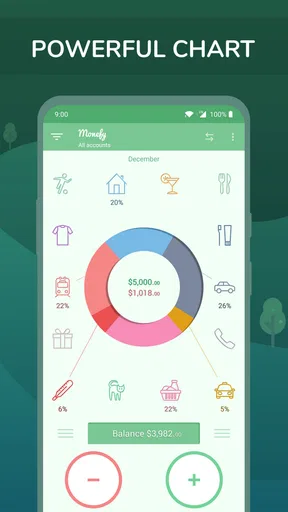
Still, a visual chart is not automatically the best way for everyone to understand a budget. If you prefer reading totals or need to inspect individual entries, the chart should be a starting point rather than the only thing you rely on. I’d check the category figures against the underlying records before making a big change, particularly if I have entered transactions quickly or used a category that no longer fits.
Motor, sensory, and situational considerations
Manual entry creates a practical accessibility trade-off: it avoids requiring a bank connection, but it also means interacting with the screen for every purchase. Someone who has difficulty tapping small controls, entering numbers, or using a phone while out may find the habit tiring. I’d try a few entries in a calm setting first and see whether the process feels comfortable, rather than assuming that a quick-looking interface will suit every hand or device.
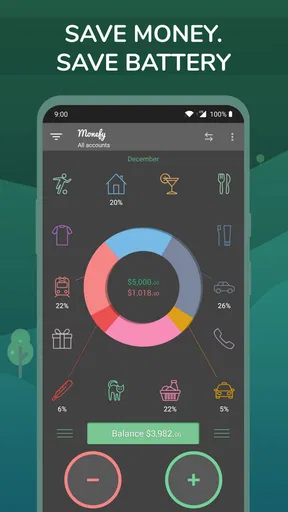
Sensory needs matter too. A chart can be a helpful visual overview, but it may be less useful if colors or visual distinctions are difficult to interpret. In that case, I would lean on category names and amounts wherever possible and use the app at a time and brightness level that feels comfortable. I would not choose any budgeting app solely on the assumption that its appearance will work for every vision or reading need.
For someone who needs to record spending while commuting, shopping, or handling another task, it may be easier to wait until they can focus. A rushed entry can land in the wrong category or be forgotten altogether. If you share household expenses, agree on a simple routine for who records what; otherwise, duplicate entries or gaps can make the combined view misleading. The app can support a shared habit, but it cannot settle household rules for you.
Where the manual approach can fall short
The main limitation is not a hidden setting; it is the ongoing work. If you often pay with a card and expect transactions to appear automatically, entering them yourself may become a chore. That friction grows when you have many small purchases, multiple people recording expenses, or a busy schedule. In those situations, a bank-linked tracker or a spreadsheet with a workflow you already maintain may be a better fit.
Backups deserve thought before you build a long history. The free version has limits, and the original review notes that backing up to Google Drive or Dropbox requires going Pro. If losing a record would matter to you, look into the available options before relying on the app as your only archive. The same applies to syncing: convenience across devices is useful, but I would first make sure the setup matches how you intend to enter and preserve your records.
There is also a difference between tracking and forecasting. A record of past expenses can show a pattern, but it does not automatically tell you whether an upcoming bill is covered or whether a longer-term goal is on track. I would pair the app with a calendar or a separate plan if due dates and future commitments are central to my finances. It is strongest as a view of recorded spending, not as a replacement for every money-management tool.
Reflective Technologies develops this finance app, which is free to install and rated for Everyone. It has a 3.9 average from around 193,000 ratings, with over 10 million installs. Those figures suggest broad use, but they cannot tell you whether the manual workflow will fit your habits. The current version is 1.22.8, and in-app purchases range from $2.49 to $59.99 per item, so I would check the upgrade details in the app before paying for a feature.
It was released on February 26, 2014, and runs on Android 5.0 or later. That makes device compatibility worth checking before you plan a routine around it, particularly if you use an older phone. The practical decision is simple: if you can enter expenses consistently and want a quick category-level view, the approach may suit you; if you need automation or more extensive planning, choose a tool built around those needs instead.
For me, the most useful test is whether I still want to open the tracker after an ordinary, slightly hectic day. If adding a few purchases feels manageable, the resulting overview can help turn a vague sense of overspending into a specific category to review. If I repeatedly postpone entries, the totals become less trustworthy, and a more automated alternative would be more honest about how I actually manage money.
Ever felt like your finances are slipping through your fingers, and you’re not quite sure where all that cash is going? Yeah, I’ve been there too. Luckily, I stumbled upon Monefy, and it's been a game-changer in how I handle my budget and expenses.
First Impressions
Downloading and installing Monefy was a breeze. It’s available on both Android and iOS, which is super convenient. Once I opened the app, I was greeted by a clean, intuitive interface. Seriously, it’s so user-friendly that even if you’re not a tech whiz, you’ll find your way around in no time.
Getting Started
Setting up my account was straightforward. The app asked me to input my initial balance, and from there, I could start tracking my expenses. What I love is that you can categorize your spending. You know, like groceries, bills, entertainment, and so on. It’s perfect for someone like me who likes to see exactly where my money goes.
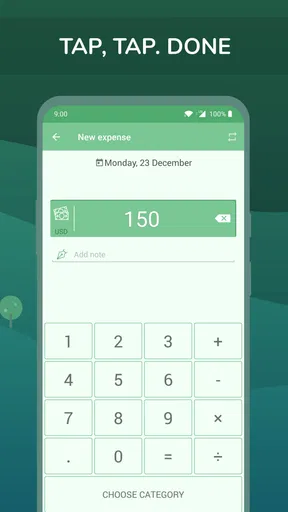
Adding expenses is as easy as pie. Just hit the big plus button, enter the amount, select a category, and boom, you’re done. The app automatically updates your balance, so you always know how much you’ve got left to burn.
Features That Stand Out
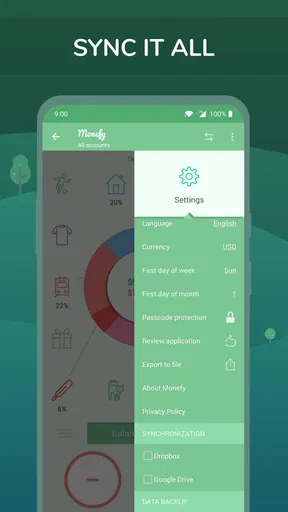
One feature I find incredibly useful is the ability to set a budget for each category. It helps me stay disciplined and not overspend on things like takeout (which is so tempting!). Another cool feature is the synchronization option. If you’re juggling multiple devices, Monefy can sync across them, keeping everything seamless.
The app also supports multiple currencies, which is a lifesaver if you travel or have expenses in different currencies. And for those of you who love visuals, Monefy provides charts and graphs that give a clear picture of your spending patterns. It’s like having a mini accountant in your pocket.
Security and Privacy
I know, I know, security is a big deal when it comes to financial apps. You can breathe easy with Monefy because it offers password protection. Plus, it doesn’t require any sensitive banking info, so you’re not sharing your deepest financial secrets with the app.
Room for Improvement
While Monefy is fantastic, no app is perfect, right? One thing I noticed is that the free version has some limitations. For instance, you can’t back up your data to Google Drive or Dropbox unless you go Pro. It’s not a deal-breaker for me, but something to keep in mind if you like having backups.
Also, the app doesn’t automatically sync with your bank accounts. So, if you’re looking for that feature, you might want to explore other options. But honestly, the manual entry helps me stay mindful of my spending, so it’s a trade-off I’m willing to make.
Final Thoughts
All in all, Monefy is a solid budgeting app that does exactly what it promises. It’s simple, effective, and perfect for anyone who wants to take control of their finances without the fuss of more complex apps. Whether you’re a budgeting newbie or a financial guru, Monefy has something to offer.
If you’re ready to get your finances in check, give Monefy a whirl. You might just find yourself saving more and stressing less about money. Isn’t that what we all want?
Pros
- Simple and intuitive user interface.
- Supports multiple currencies.
- Real-time expense tracking.
- Customizable categories for expenses.
- Data backup and sync options.
Cons
- Limited features in free version.
- No option for detailed reports.
- Lacks integration with banks.
- Recurring payments feature is basic.
- Premium features can be pricey.
FAQs for Monefy - Budget & Expenses app
What features does Monefy offer for managing budgets?
Monefy provides a wide array of features to help users manage their finances efficiently. These include expense tracking, budget setting, and financial reporting. The app allows you to categorize expenses, set limits, and visualize your spending habits through charts and graphs. It also supports multiple currencies, making it versatile for international users.
Is Monefy secure for handling personal financial data?
Yes, Monefy takes user security seriously. The app does not require you to link your bank accounts, ensuring your sensitive information remains private. Additionally, Monefy offers password protection to secure the app, and data can be backed up and restored using Google Drive or Dropbox, providing an extra layer of security.
Can Monefy be used offline?
Monefy is designed to work offline, making it convenient for users who may not always have internet access. You can input and track expenses without an internet connection, and the app will sync your data once connectivity is restored. This feature ensures continuous access to your financial information.
How user-friendly is Monefy for beginners?
Monefy is highly user-friendly, particularly for those new to budgeting apps. The interface is intuitive and straightforward, featuring clear icons and easy navigation. Adding expenses takes just a few taps, and the app provides helpful tips to guide users through setup and daily use. It’s designed to make budgeting simple and accessible.
Is there a cost associated with using Monefy?
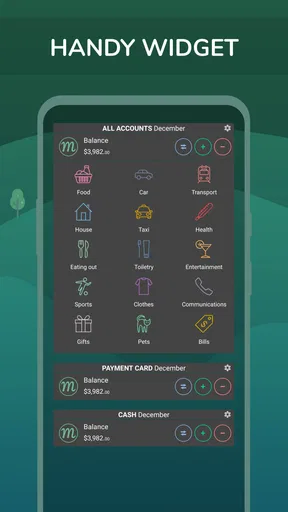
Monefy offers both a free version and a paid Pro version. The free version includes essential budgeting features, while the Pro version, available for a one-time fee, offers additional features such as more detailed reporting, widgets, and the ability to manage multiple accounts. This tiered approach allows users to choose the level of functionality that best suits their needs.


